> For the complete documentation index, see [llms.txt](https://hezhiqiang.gitbook.io/about-the-author/llms.txt). Markdown versions of documentation pages are available by appending `.md` to page URLs; this page is available as [Markdown](https://hezhiqiang.gitbook.io/about-the-author/windows-xi-tong-gu-zhang-pai-cha/windows-he-windows-server-zhong-qi-yong-jin-yong-smbv1smbv2-he-smbv3.md).
# Windows 和 Windows Server 中启用/禁用 SMBv1、SMBv2 和 SMBv3
#### 博客作者:联系请[点击](https://hezhiqiang.gitbook.io/about-the-author/lian-xi-zuo-zhe),搬运不易,希望请作者喝咖啡,可以点击[联系博客作者](https://hezhiqiang.gitbook.io/about-the-author/lian-xi-zuo-zhe)
本文介绍如何在 SMB 客户端和服务器组件上启用/禁用服务器消息块 SMBv1、SMBv2 和 SMBv3。
{% hint style="danger" %}
**注意**
* 建议由专业运维技术工程师完成本文的操作。
* 建议不要禁用 SMBv2 或 SMBv3。禁用 SMBv2 或 SMBv3 只能作为临时故障排除措施。请勿使 SMBv2 或 SMBv3 保持禁用状态。
{% endhint %}
## 禁用 SMBv2 的影响
在 Windows 7 和 Windows Server 2008 R2 中,禁用 SMBv2 会停用以下功能:
* 请求复合 - 允许发送多个 SMB 2 请求作为单个网络请求
* 大型读写 - 更好地利用更快速的网络
* 文件夹和文件属性缓存 - 客户端保留文件夹和文件的本地副本
* 持久句柄 - 如果临时断开连接,则允许连接以透明方式重新连接到服务器
* 改进的消息签名 - HMAC SHA-256 代替 MD5 作为哈希算法
* 改进的文件共享扩展性 - 每个服务器的用户数量、共享数量和打开文件数量大大增加
* 支持符号链接
* 客户端 oplock 租赁模式 - 限制在客户端和服务器之间传输的数据,从而提高高延迟网络性能并增强 SMB 服务器的扩展性
* 大型 MTU 支持 - 可充分利用 10 千兆字节 (GB) 以太网
* 改进的能效 - 向服务器打开文件的客户端可以睡眠
## 禁用 SMBv3 的影响
在 Windows 8、Windows 8.1、Windows 10、Windows Server 2012 和 Windows Server 2016 中,禁用 SMBv3 会停用以下功能(**以及以上列表中所述的 SMBv2 功能**):
* 透明故障转移 - 在维护或故障转移期间,客户端会重新连接,不会干扰集群节点
* 扩展 – 并发访问所有文件集群节点上的共享数据
* 多通道 - 如果客户端和服务器之间有多个路径可用时,则聚合网络带宽和容错
* SMB 直通 – 增加 RDMA 网络支持,实现极高的性能、低延迟和低 CPU 利用率
* 加密 – 提供端到端加密,并防止不可靠网络上的窃听
* 目录租赁 - 通过缓存改进分支机构中应用程序的响应时间
* 性能优化 - 对小型随机读/写 I/O 的优化
## 在 SMB 服务器上启用/禁用 SMB 协议
### Windows 8 和 Windows Server 2012
Windows 8 和 Windows Server 2012 引入了新的 Set-SMBServerConfiguration Windows PowerShell cmdlet。 通过此 cmdlet,你可以在服务器组件上启用或禁用 SMBv1、SMBv2 和 SMBv3 协议。
{% hint style="danger" %}
**注意**:因为 SMBv2 和 SMBv3 共用一个堆叠,所以在 Windows 8 或 Windows Server 2012 中启用或禁用 SMBv2 时,也会启用或禁用 SMBv3。
{% endhint %}
### 使用 PowerShell cmdlet
运行 **Set-SMBServerConfiguration** cmdlet 后,无须重启计算机。
* 若要获取 SMB 服务器协议配置的当前状态,请运行以下 cmdlet:
```
Get-SmbServerConfiguration | Select EnableSMB1Protocol, EnableSMB2Protocol
```
* 若要在 SMB 服务器上禁用 SMBv1,请运行以下 cmdlet:
```
Set-SmbServerConfiguration -EnableSMB1Protocol $false
```
* 若要在 SMB 服务器上禁用 SMBv2 和 SMBv3,请运行以下 cmdlet:
```
Set-SmbServerConfiguration -EnableSMB2Protocol $false
```
* 若要在 SMB 服务器上启用 SMBv1,请运行以下 cmdlet:
```
Set-SmbServerConfiguration -EnableSMB1Protocol $true
```
* 若要在 SMB 服务器上启用 SMBv2 和 SMBv3,请运行以下 cmdlet:
```
Set-SmbServerConfiguration -EnableSMB2Protocol $true
```
### Windows 7、Windows Server 2008 R2、Windows Vista 和 Windows Server 2008
若要在运行 Windows 7、Windows Server 2008 R2、Windows Vista 或 Windows Server 2008 的 SMB 服务器上启用或禁用 SMB 协议,请使用 Windows PowerShell 或注册表编辑器。
### 使用 Windows PowerShell 2.0 或更高版本的 PowerShell
* 若要在 SMB 服务器上禁用 SMBv1,请运行以下 cmdlet:
```
Set-ItemProperty -Path "HKLM:\SYSTEM\CurrentControlSet\Services\LanmanServer\Parameters" SMB1 -Type DWORD -Value 0 -Force
```
* 若要在 SMB 服务器上禁用 SMBv2 和 SMBv3,请运行以下 cmdlet:
```
Set-ItemProperty -Path "HKLM:\SYSTEM\CurrentControlSet\Services\LanmanServer\Parameters" SMB2 -Type DWORD -Value 0 -Force
```
* 若要在 SMB 服务器上启用 SMBv1,请运行以下 cmdlet:
```
Set-ItemProperty -Path "HKLM:\SYSTEM\CurrentControlSet\Services\LanmanServer\Parameters" SMB1 -Type DWORD -Value 1 -Force
```
* 若要在 SMB 服务器上启用 SMBv2 和 SMBv3,请运行以下 cmdlet:
```
Set-ItemProperty -Path "HKLM:\SYSTEM\CurrentControlSet\Services\LanmanServer\Parameters" SMB2 -Type DWORD -Value 1 -Force
```
{% hint style="danger" %}
**注意**:进行更改后,必须重启计算机。
{% endhint %}
## 使用注册表编辑器
{% hint style="danger" %}
**注意**:以下内容包含有关如何修改注册表的信息。修改注册表之前,一定要先对其进行备份。并且一定要知道在发生问题时如何还原注册表。有关如何备份、还原和修改注册表的更多信息,请查看 [如何在 Windows 中备份和还原注册表](https://support.microsoft.com/zh-cn/help/322756)。
{% endhint %}
* 若要在 SMB 服务器上启用或禁用 SMBv1,请配置以下注册表项:
* 注册表子项:`HKEY_LOCAL_MACHINE\SYSTEM\CurrentControlSet\Services\LanmanServer\Parameters` 注册表项: SMB1
* REG\_DWORD: 0 = 已禁用
* REG\_DWORD: 1 = 已启用
* 默认值: 1 = 已启用
* 若要在 SMB 服务器上启用或禁用 SMBv2,请配置以下注册表项:
* 注册表子项:`HKEY_LOCAL_MACHINE\SYSTEM\CurrentControlSet\Services\LanmanServer\Parameters` 注册表项: SMB2
* REG\_DWORD: 0 = 已禁用
* REG\_DWORD: 1 = 已启用
* 默认值: 1 = 已启用
## 在 SMB 客户端上启用/禁用 SMB 协议
### Windows Vista、Windows Server 2008、Windows 7、Windows Server 2008 R2、Windows 8 和 Windows Server 2012
{% hint style="danger" %}
**注意**:因为 SMBv2 和 SMBv3 共用一个堆叠,所以在 Windows 8 或 Windows Server 2012 中启用或禁用 SMBv2 时,也会启用或禁用 SMBv3。
{% endhint %}
* 若要在 SMB 客户端上禁用 SMBv1,请运行以下命令:
```
sc.exe config lanmanworkstation depend= bowser/mrxsmb20/nsi
sc.exe config mrxsmb10 start= disabled
```
* 若要在 SMB 客户端上启用 SMBv1,请运行以下命令:
```
sc.exe config lanmanworkstation depend= bowser/mrxsmb10/mrxsmb20/nsi
sc.exe config mrxsmb10 start= auto
```
* 若要在 SMB 客户端上禁用 SMBv2 和 SMBv3,请运行以下命令:
```
sc.exe config lanmanworkstation depend= bowser/mrxsmb10/nsi
sc.exe config mrxsmb20 start= disabled
```
* 若要在 SMB 客户端上启用 SMBv2 和 SMBv3,请运行以下命令:
```
sc.exe config lanmanworkstation depend= bowser/mrxsmb10/mrxsmb20/nsi
sc.exe config mrxsmb20 start= auto
```
{% hint style="danger" %}
**注意**:
* 必须在提升的命令提示符中运行这些命令。
* 进行这些更改后,必须重启计算机。
{% endhint %}
## 使用组策略禁用 SMBv1 服务器
这将在注册表中配置以下新项:
`HKEY_LOCAL_MACHINE\SYSTEM\CurrentControlSet\Services\LanmanServer\Parameters` 注册表项: SMB1 REG\_DWORD: 0 = Disabled
### 使用组策略配置流程
1. 打开组策略管理控制台。右键单击应包含新首选项的组策略对象 (GPO),然后单击 **编辑**。
2. 在 **计算机配置** 下的控制台树中,展开 **首选项** 文件夹,然后展开 **Windows 设置** 文件夹。
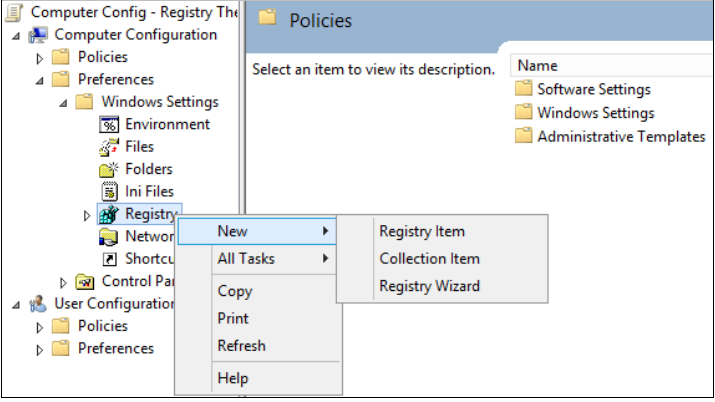
3. 右键单击 **注册表** 节点,指向 **新建**,然后选择 **注册表项**。
[](http://docs-aliyun.cn-hangzhou.oss.aliyun-inc.com/assets/pic/57499/cn_zh/1501635501812/sg1.png)
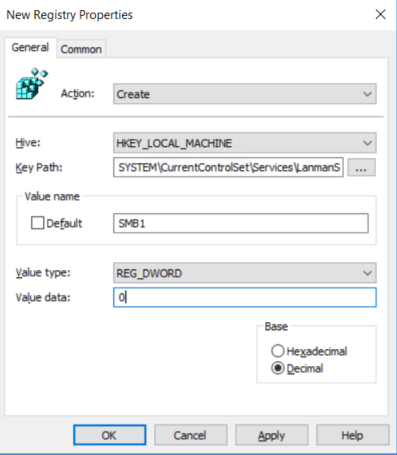
4. 在 **新建注册表属性** 对话框中,选择以下内容:
* 操作: 创建
* Hive: HKEY\_LOCAL\_MACHINE
* 注册表项路径: SYSTEM\CurrentControlSet\Services\LanmanServer\Parameters
* 值名称: SMB1
* 值类型: REG\_DWORD
* 值数据: 0
[](http://docs-aliyun.cn-hangzhou.oss.aliyun-inc.com/assets/pic/57499/cn_zh/1501635561647/sg2.png)
5. 将此组策略应用到域中所有必需的工作站、服务器和域控制器,以禁用 SMBv1 服务器组件。也可以将 WMI 筛选器设置为不包含不受支持的操作系统或选中的排除项(如 Windows XP)。
{% hint style="danger" %}
**注意**:在旧版 Windows XP 或 Linux 早期版本以及第三方系统(不支持 SMBv2 或 SMBv3)需要访问 SYSVOL 或其他文件共享(已启用 SMB v1)的域控制器上进行这些更改时要谨慎小心。
{% endhint %}
## 使用组策略禁用 SMBv1 客户端
若要禁用 SMBv1 客户端,需要将服务注册表项更新为禁止 MRxSMB10 启动,然后还需要将 MRxSMB10 的依赖项从 LanmanWorkstation 项中删除,以便它可以正常启动(无需首先启动 MRxSMB10)。
这将更新和替换注册表以下 2 个项中的默认值
* `HKEY_LOCAL_MACHINE\SYSTEM\CurrentControlSet\services\mrxsmb10` 注册表项: Start REG\_DWORD: 4 = Disabled
* `HKEY_LOCAL_MACHINE\SYSTEM\CurrentControlSet\Services\LanmanWorkstation` 注册表项: DependOnService REG\_MULTI\_SZ: “Bowser”,”MRxSmb20″,”NSI”
{% hint style="danger" %}
**注意**:默认包含的 MRxSMB10 现已作为依赖项删除。
{% endhint %}
### 使用组策略配置流程
1. 打开组策略管理控制台。右键单击应包含新首选项的组策略对象 (GPO),然后单击 **编辑**。
2. 在 **计算机配置** 下的控制台树中,展开 **首选项** 文件夹,然后展开 **Windows 设置** 文件夹。
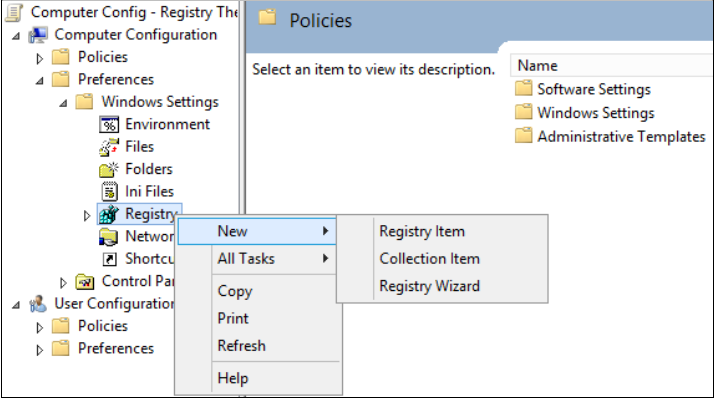
3. 右键单击 **注册表** 节点,指向 **新建**,然后选择 **注册表项**。
[](http://docs-aliyun.cn-hangzhou.oss.aliyun-inc.com/assets/pic/57499/cn_zh/1501635682025/sg3.png)
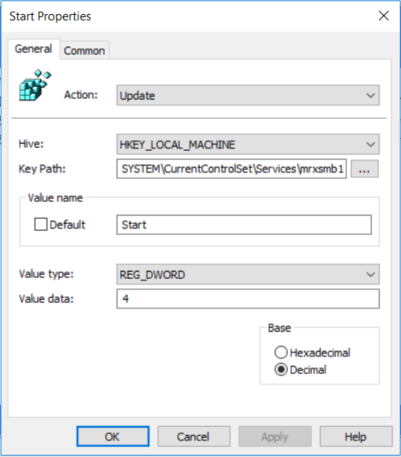
4. 在 **新建注册表属性** 对话框中,选择以下内容:
* 操作: 更新
* Hive: HKEY\_LOCAL\_MACHINE
* 注册表项路径: SYSTEM\CurrentControlSet\services\mrxsmb10
* 值名称: Start
* 值类型: REG\_DWORD
* 值数据: 4
[](http://docs-aliyun.cn-hangzhou.oss.aliyun-inc.com/assets/pic/57499/cn_zh/1501635716316/sg4.png)
然后删除刚刚禁用的 MRxSMB10 的依赖项
5. 在 **新建注册表属性** 对话框中,选择以下内容:
* 操作: 替换
* Hive: HKEY\_LOCAL\_MACHINE
* 注册表项路径: SYSTEM\CurrentControlSet\Services\LanmanWorkstation
* 值名称: DependOnService
* 值类型 REG\_MULTI\_SZ
* 值数据:
* Bowser
* MRxSmb20
* NSI
{% hint style="danger" %}
**注意**: 这 3 个字符串不带项目符号(具体如下)
{% endhint %}
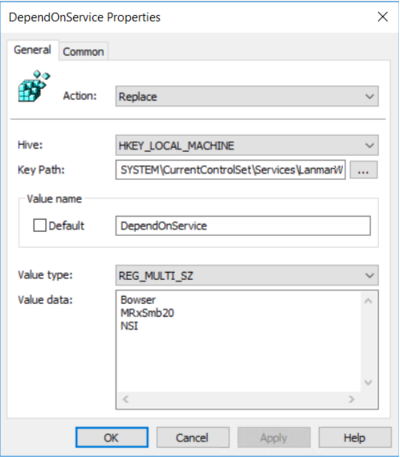
在 Windows 的多个版本中,默认值包括 MRxSMB10,通过将其替换为此多值字符串,实际上就删除了作为 LanmanServer 依赖项的 MRxSMB10,结果是从四个默认值减少为上述这三个值。
{% hint style="danger" %}
**注意**:使用组策略管理控制台时,无需使用引号或逗号。只需在各行键入每个项,如上面所示。
{% endhint %}
### 需要重新启动
应用策略且正确设置注册表后,必须重新启动目标系统,然后才能禁用 SMB v1。
## 摘要
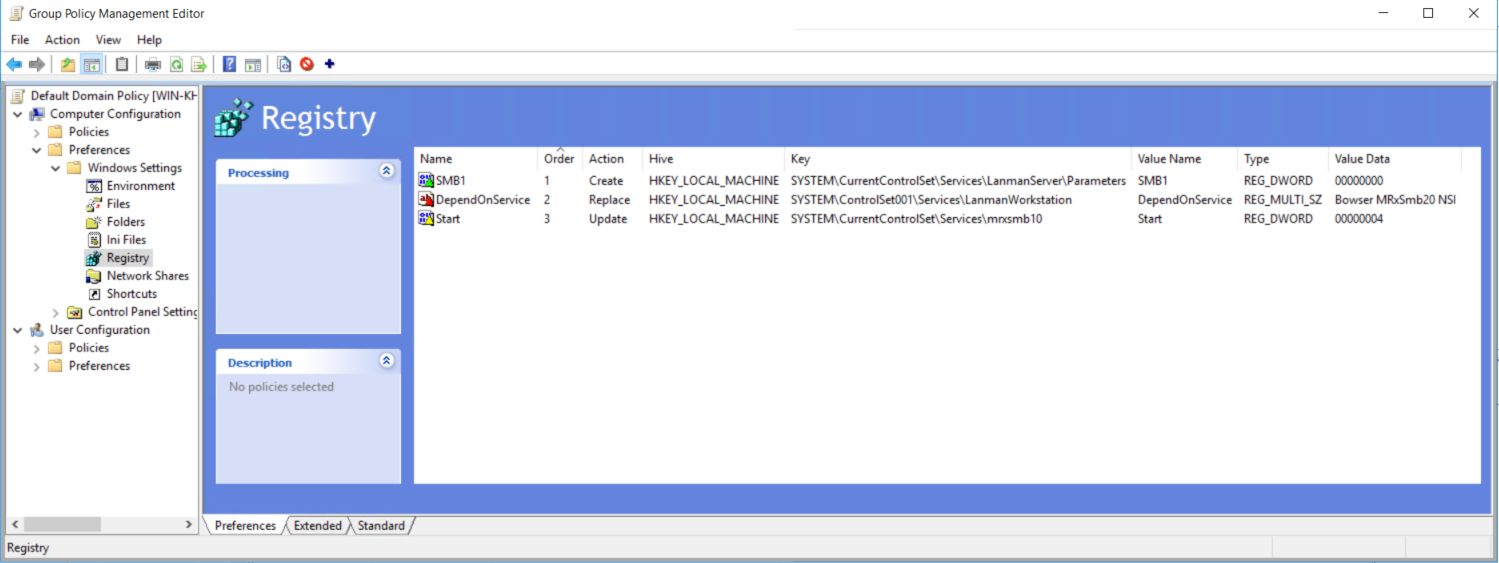
如果所有设置均在同一组策略对象 (GPO) 中,组策略管理将显示以下设置。
## 测试和验证
配置完成后即允许策略进行复制和更新。作为测试的必要步骤,请从 `CMD.EXE` 提示符处运行 `gpupdate/force`,然后查看目标计算机,以确保注册表设置得以正确应用。确保 SMBv2 和 SMBv3 在环境中的所有其他系统中正常运行。
{% hint style="danger" %}
**注意**:请务必重新启动目标系统。
{% endhint %}
### 如何在 Windows 8.1、Windows 10、Windows 2012 R2 和 Windows Server 2016 中轻松删除 SMBv1
### Windows Server:使用 “服务器管理器”

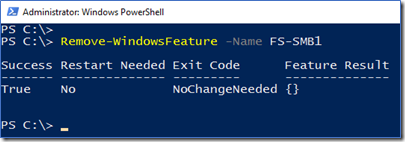
### Windows Server:使用 PowerShell (Remove-WindowsFeature FS-SMB1)
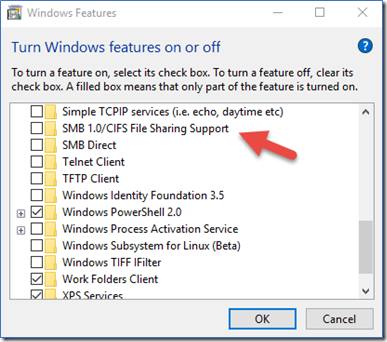
### Windows 客户端:使用 “添加或删除程序”
### Windows 客户端:使用 PowerShell (Disable-WindowsOptionalFeature -Online -FeatureName smb1protocol)

## 参考与适用性
本文来源自微软官方技术文档:[如何在 Windows 和 Windows Server 中启用和禁用 SMBv1、SMBv2 和 SMBv3](https://support.microsoft.com/zh-cn/help/2696547/how-to-enable-and-disable-smbv1-smbv2-and-smbv3-in-windows-and-windows)。
如有变化,以微软官方为准。
这篇文章中的信息适用于:
* Windows 10 Pro released in July 2015,
* Windows 10 Enterprise released in July 2015
* Windows Vista Enterprise
* Windows Vista Business
* Windows Vista Home Basic
* Windows Vista Home Premium
* Windows Vista Ultimate
* Windows 7 Enterprise
* Windows 7 Home Basic
* Windows 7 Home Premium
* Windows 7 Professional
* Windows 7 Ultimate
* Windows Server 2008 Datacenter
* Windows Server 2008 Enterprise
* Windows Server 2008 Standard
* Windows Server 2008 R2 Datacenter
* Windows Server 2008 R2 Enterprise
* Windows Server 2008 R2 Standard
* Windows 8
* Windows 8 Enterprise
* Windows 8 Pro
* Windows Server 2012 Datacenter
* Windows Server 2012 Datacente
* Windows Server 2012 Essentials
* Windows Server 2012 Foundation
* Windows Server 2012 Foundation
* Windows Server 2012 Standard
* Windows Server 2012 Standard
* Windows Server 2016